
Commercial Carpet Project Closeout Checklist for Buyers
A handover framework for importers, contractors, project managers and facilities teams retaining the records needed to operate, maintain and later replace commercial carpet.
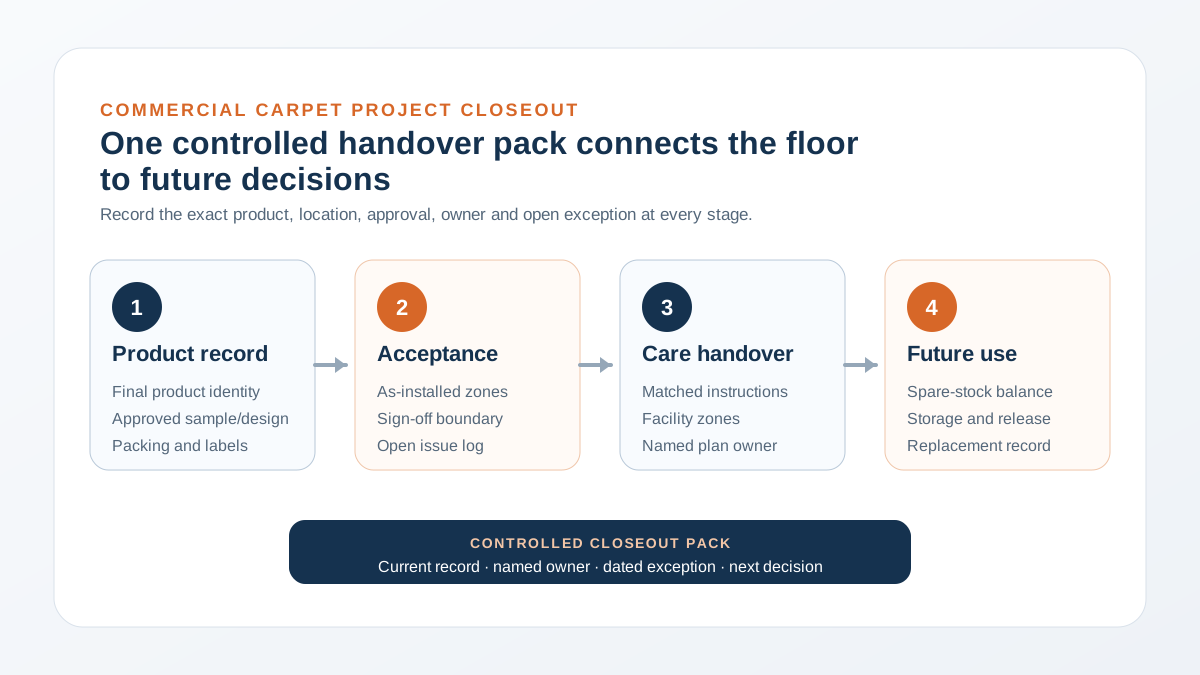
Pain Point Addressed
A floor can look complete at handover while the product identity, installed-zone record, approved care file, spare-stock location and unresolved issues remain scattered across emails or disappear with the project team.
Quick Answer: Close the Record Before the Project Team Leaves
Before commercial carpet is handed to building operations, assemble one controlled closeout pack with the final product identity, accepted installation and zone record, product-matched care instructions, spare-material inventory, open-issue log and named owners. Record what is missing instead of treating an incomplete pack as complete.
The required documents depend on the contract, selected carpet, installation system and building. This guide organizes buyer decisions; it does not create a VCARPETS warranty, universal cleaning schedule, installation approval or certificate. The signed project documents and instructions for the exact supplied construction remain controlling.
Build the Closeout Pack Around Six Buyer Decisions
GSA's example contract-administration files include operation and maintenance manuals, as-built records and other closeout documentation. A carpet handover can apply that general control at floor-finish level without assuming every project needs the same form.
| Closeout record | Minimum buyer question | Primary owner to confirm |
|---|---|---|
| Final product schedule | What exact carpet, colour, construction, format and approved reference was supplied to each zone? | Buyer, supplier and design/project team |
| As-installed zone record | Where was each product, direction, roll or available batch/production reference installed? | Installer and project manager |
| Acceptance and exceptions | What was accepted, held, corrected or left open, by whom and on what date? | Authorized project approver |
| Care and maintenance file | Which instructions apply to the exact carpet and who owns the facility plan? | Supplier, facilities team and cleaning contractor |
| Spare-material inventory | What remains, how is it identified, where is it stored and who releases it? | Buyer and facilities/store owner |
| Issue and warranty route | Which contract contact receives an issue and what evidence must accompany it? | Buyer, contracted supplier and responsible installer |
Assign a real owner and document reference for every row. 'By others' is not a usable handover unless the responsible party is named.
Record the Product That Was Actually Installed
Use the final approved quotation, purchase order, sample or strike-off decision and packing/label records to create the product schedule. Do not copy an early specification if the approved construction or colour changed. Keep superseded records clearly marked so the facilities team does not treat them as current.
| Carpet type | Identity to retain | Location record |
|---|---|---|
| Modular carpet tile | Product/design, colour, tile format, backing, approved sample and available batch or production reference | Floor or zone, layout direction, fixing system reference and spare-carton location |
| Commercial broadloom | Product/design, colour, construction, width or roll reference, backing/underlay decision and approved sample | Roll/cut allocation, seam or room plan, transition areas and retained offcut or spare record |
| Custom patterned carpet | Approved artwork or colour revision, strike-off reference, construction and package/roll identity | Room or area schedule, orientation, pattern/seam plan and approved exceptions |
Only record a field that is confirmed for the supplied product. Mark an unavailable batch, backing, roll or test reference as unavailable or pending rather than inventing it.
If the packing list or carton label is still being approved, finish that reconciliation before closeout so the handover pack connects the purchase record to the physical product.
Separate Installation Acceptance From Product Supply Records
A supplier's product record cannot by itself confirm substrate condition, adhesive compatibility, layout execution or site workmanship. The project team should retain the installer and consultant records required by the contract, including the accepted area, inspection date, relevant drawing revision, open punch-list items and resolution owner.
- Define the acceptance boundary: state whether the sign-off covers delivery condition, product identity, sample appearance, installed workmanship or final project acceptance.
- Map exceptions to a location: record the room, floor, grid, photograph reference or drawing markup rather than writing a general note such as 'repair carpet.'
- Preserve the decision trail: identify who approved a correction, substitution or retained condition and which revised record became current.
- Keep site evidence with the installer file: the responsible installer or project party should retain the applicable substrate, fixing, seam, direction and completion records.
The delivery inspection checklist helps project teams separate received, held and released cartons before installation. Carry those identities into the final installed-zone record instead of restarting the trail at handover.
Keep protection removal, final cleaning, condition inspection and operational handover as separate dated decisions. The commercial carpet protection and handover checklist provides the zone record that connects later-trade access and damage exceptions to this closeout file.
Hand Over a Product-Matched Maintenance File
The Carpet and Rug Institute publishes CRI 204 as a commercial carpet maintenance and cleaning standard. CRI also advises facilities to follow the carpet manufacturer's recommendations. Interface's public carpet-tile guidance illustrates why the operating plan is facility-specific: traffic volume and soiling vary by zone, and the maintenance program is customized accordingly.
- Applicable document: identify the care file that matches the exact supplied fiber, construction and backing; keep its revision or issue date.
- Facility zones: map entrances, corridors, work areas, guestrooms and spill- or soil-prone areas instead of assigning one assumed frequency to the whole building.
- Method approval: record who checks equipment, chemistry and proposed procedures against the product instructions and project requirements.
- Incident record: give the facilities team a route for documenting spills, damage, attempted treatment, photographs and affected product identity before escalation.
Use the VCARPETS maintenance planning resource to prepare the product and operating questions that belong in the handover discussion.
Close the Spare-Stock and Replacement Record
Count retained cartons, rolls, pieces or offcuts at handover and connect them to the final product schedule. Label the storage location, custodian, quantity, unit, condition and available batch or production reference. Record withdrawals later so the facilities team does not rely on a reserve balance that no longer exists.
| Spare-stock field | Closeout entry | Later-use control |
|---|---|---|
| Product identity | Exact product/design, colour, format and approved reference | Compare against the installed-zone record |
| Quantity and unit | Cartons, pieces, square metres, rolls or measured offcuts | Update after every withdrawal or disposal |
| Traceability | Available batch, dye-lot, roll or production reference | Do not promise an invisible future match |
| Storage | Location, custodian and known condition | Follow the exact product's storage instructions |
| Release | Reason, affected zone, quantity, date and approver | Retain installation and issue evidence with the balance |
There is no universal spare percentage in this guide. Quantity depends on layout, damage risk, product availability, project policy and replacement strategy.
For tile-specific batch allocation, reserve inventory and later visual review, use the replenishment guide and its blank batch/zone/spare record.
Use One Open-Issue and Responsibility Log
A closeout pack should show unresolved items as clearly as completed ones. Give each issue a location, product identity, date observed, evidence reference, immediate status, responsible owner and next decision date. Keep supply, transport, storage, installation, cleaning and building-operation questions separate until evidence connects them.
| Issue field | Example of a usable entry | Avoid |
|---|---|---|
| Location | Level 3, meeting room 3B, north doorway | Carpet area |
| Identity | Approved product/colour plus carton, roll or zone reference | Blue carpet |
| Observed condition | Neutral description with dated photographs | Defective without investigation |
| Current status | Open, under review, corrected, accepted with record or closed | Done |
| Owner and next step | Named organization/person, required evidence and review date | Supplier to handle |
Warranty scope, notice periods, exclusions and required evidence come from the applicable written terms. Do not infer coverage from this checklist, a product category or a photograph. Keep the signed commercial record and the party responsible for the actual transaction in the closeout file.
When an open issue needs a formal review after handover, use the commercial carpet warranty-claim documentation checklist to connect the written terms, exact product, affected zone, installation and maintenance history, retained evidence and requested outcome.
Send an Order-Ready Closeout Requirement With the RFQ
Define the supplier-facing closeout fields before ordering rather than asking for an undefined document pack after installation. For a VCARPETS B2B quotation, send the application, area, product or design reference, destination, project timing and the product records that the buyer expects at shipment or handover. Bulk supply is discussed on an FOB Tianjin Port basis.
- Project use: office, hotel, corridor, entertainment, retail or another commercial area, separated by zone.
- Scope: estimated area or quantity, selected format/construction and approved sample, design or drawing reference.
- Destination: country and nominated logistics point for the FOB discussion.
- Programme: sample, production, shipment, installation and target handover milestones that require confirmation.
- Closeout fields: product schedule, packing/label identity, care documents, spare-stock record and other product-specific deliverables.
- Open dependencies: local technical, installation, maintenance, warranty or compliance requirements that the project parties must verify.
Submit these inputs through the VCARPETS inquiry form so the product quotation and available document set can be reviewed together. The form has no file upload; mention available schedules, drawings or checklists so the team can arrange an exchange after replying.
Sources and Scope Boundaries
General closeout record categories were checked against GSA's example contract-administration files on 27 October 2026. Commercial maintenance controls were checked against the Carpet and Rug Institute's CRI 204 resources and facility-specific guidance. Interface's public carpet-tile maintenance document was used only to confirm that a maintenance program is facility-specific. These sources do not establish VCARPETS product performance, warranty or service scope.
This article is a procurement and handover framework. The signed quotation and contract, final product documents, project specifications, installer records, applicable warranty terms, local requirements and responsible professional decisions control the actual project.
Commercial Carpet Project Closeout FAQ
What belongs in a commercial carpet project closeout pack?
Keep the final product schedule, approved sample/design reference, as-installed zone record, acceptance and exception log, product-matched care file, spare-stock inventory and the applicable commercial or issue contacts. The contract may require additional records.
Who should approve a commercial carpet handover?
The contract should name the authorized approver. Product identity may involve the buyer and supplier; installation acceptance may involve the installer, consultant or project manager; the facilities team should accept the maintenance and spare-stock records it will operate.
Is a delivery receipt enough for carpet closeout?
No. A delivery receipt can record package delivery, but it does not automatically confirm product identity, installed location, workmanship, care instructions, spare stock or closure of project exceptions. Define each sign-off separately.
Should every commercial carpet use the same cleaning schedule?
No. The plan depends on the exact carpet, facility, traffic, soil, operating hours and approved cleaning system. Use the product-matched instructions and have the responsible facilities and cleaning parties define the site plan.
How should spare carpet be recorded at handover?
Record the exact product and colour, quantity and unit, available batch or production reference, storage location, custodian and condition. Update the balance after each withdrawal. Do not promise that later material will be visually identical.
What should a buyer send VCARPETS before requesting closeout documents?
Send the application, estimated area or quantity, product/design reference, destination, project milestones and required product-record fields. Mention any schedules, drawings or checklists. VCARPETS confirms available product-specific records, packing, samples, timing and commercial terms in writing.
Buyer Questions
Frequently Asked Questions
What belongs in a commercial carpet project closeout pack?
Keep the final product schedule, approved sample/design reference, as-installed zone record, acceptance and exception log, product-matched care file, spare-stock inventory and the applicable commercial or issue contacts. The contract may require additional records.
Who should approve a commercial carpet handover?
The contract should name the authorized approver. Product identity may involve the buyer and supplier; installation acceptance may involve the installer, consultant or project manager; the facilities team should accept the maintenance and spare-stock records it will operate.
Is a delivery receipt enough for carpet closeout?
No. A delivery receipt can record package delivery, but it does not automatically confirm product identity, installed location, workmanship, care instructions, spare stock or closure of project exceptions. Define each sign-off separately.
Should every commercial carpet use the same cleaning schedule?
No. The plan depends on the exact carpet, facility, traffic, soil, operating hours and approved cleaning system. Use the product-matched instructions and have the responsible facilities and cleaning parties define the site plan.
How should spare carpet be recorded at handover?
Record the exact product and colour, quantity and unit, available batch or production reference, storage location, custodian and condition. Update the balance after each withdrawal. Do not promise that later material will be visually identical.
What should a buyer send VCARPETS before requesting closeout documents?
Send the application, estimated area or quantity, product/design reference, destination, project milestones and required product-record fields. Mention any schedules, drawings or checklists. VCARPETS confirms available product-specific records, packing, samples, timing and commercial terms in writing.
Turn This Guide Into a Quote
Send Your Project Requirements After Reading This Guide
If this topic matches your project, send the carpet application, estimated area, destination, and required date. VCARPETS can recommend the related product path and reply with sample, MOQ, lead time, and quotation details.
Email: sales@vcarpets.com
Continue Your Specification
Related Products

Browse the Full Range
Related Product Categories
Product Category
Commercial Carpet Tiles
Modular commercial carpet tiles for offices, hotels, corridors, education, and phased replacement programs.
View Category →
Product Category
Wall-to-Wall Carpets
Custom broadloom carpet for guestrooms, corridors, lobbies, ballrooms, and branded hospitality interiors.
View Category →